Examina Medical · iPhone · iPad · Mac · For physicians
History and examination,
in order, on the record.
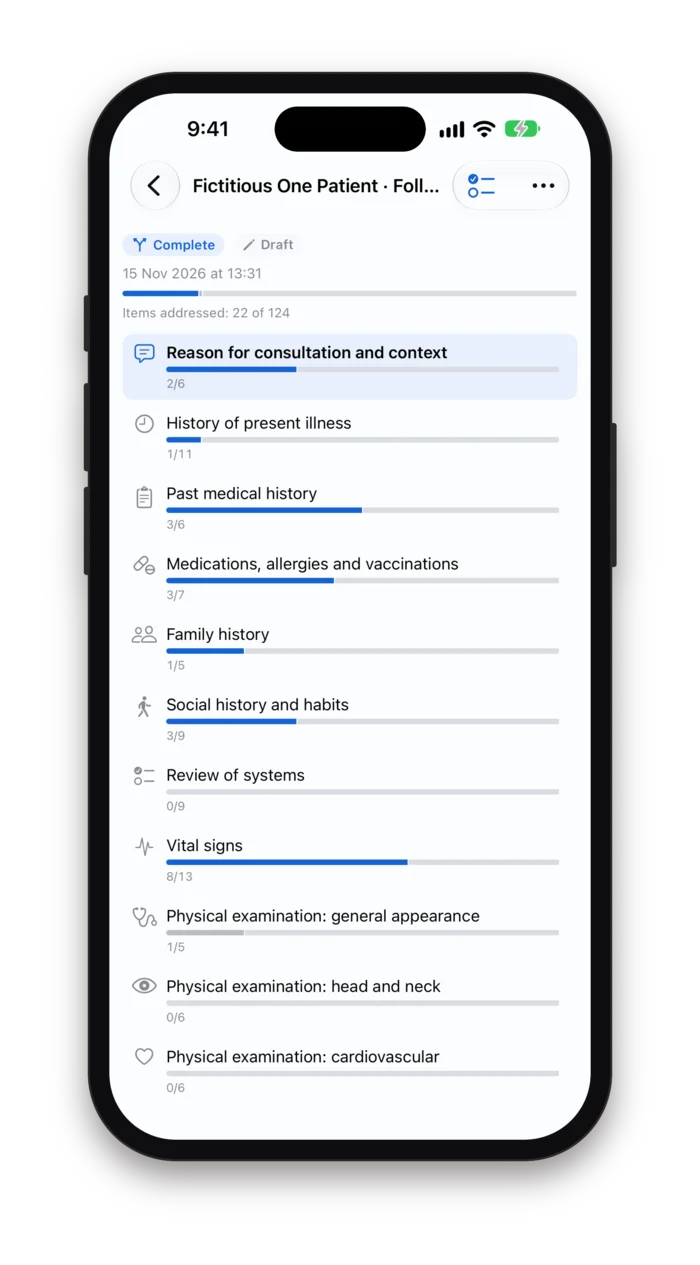
Examina Medical guides a physician through the medical visit the way it is taught: reason for consultation, history of present illness, past history, medications and allergies, family and social history, review of systems, vital signs, then the physical examination system by system.
Sites of symptoms and findings go on an interactive body atlas. Every item says whether it was recorded, not examined or not assessable. When the visit is done you review it, finalize it, and export a PDF or, with Examina Pro, an HL7 FHIR R4 document, only if you choose to.
Version 1.0 · iPhone, iPad and Mac · 9 languages · Free for up to five patients, Examina Pro for more
Works offline · No account · Clinical content encrypted on the device
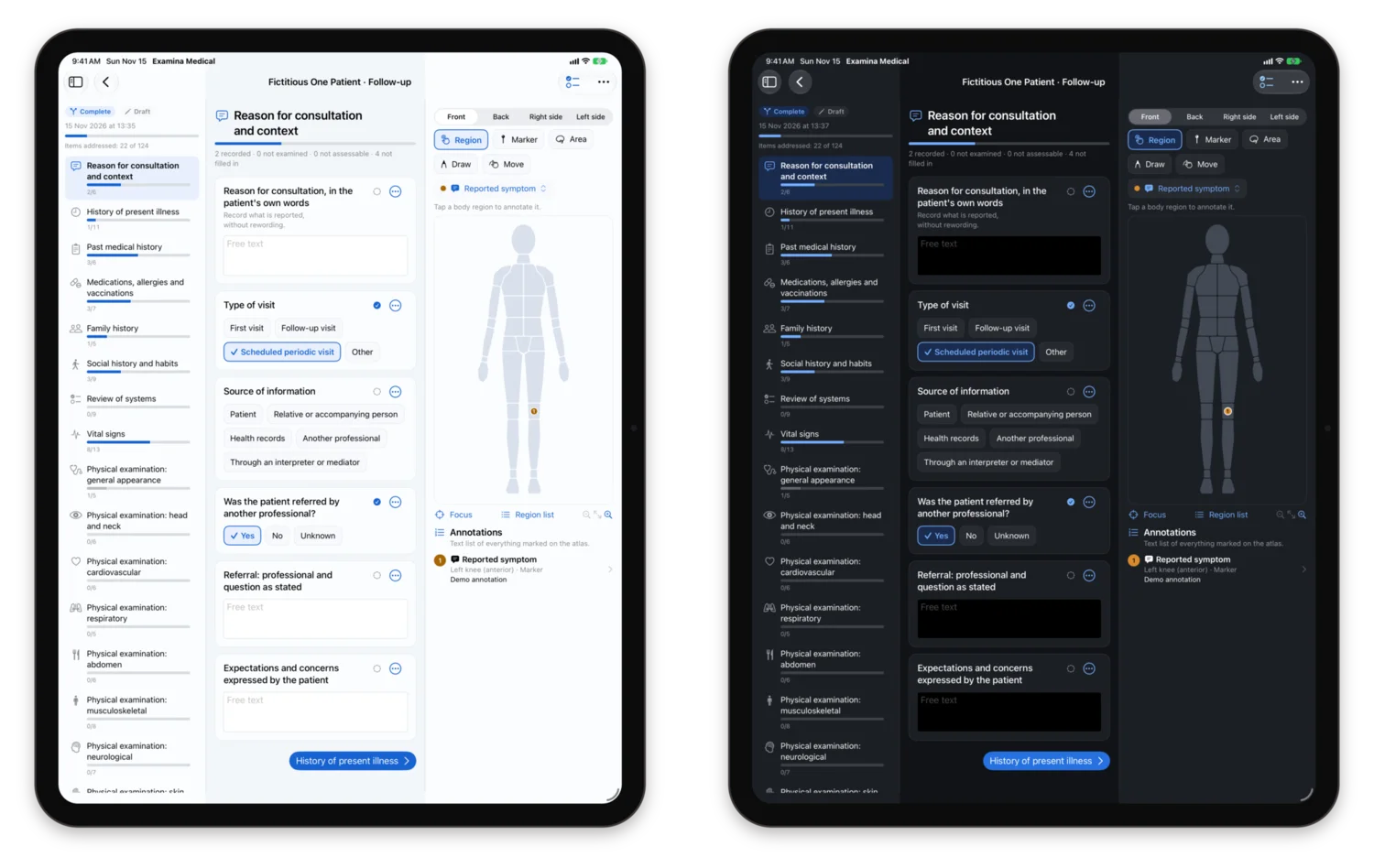
The same visit on iPad, in light and dark appearance.
A structured visit, without a hospital system
Outside a hospital, the medical visit is usually documented in a word processor, a notebook or a generic form, and the structure lives only in the physician's head. Sections are skipped silently, a blank line could mean normal or not checked, and the next visit starts from scratch.
Examina Medical keeps the classic progression of history and physical examination as a checklist you move through at your own pace, on the device you already carry. It records and organises; it never interprets.
Eighteen sections
From the reason for consultation to the professional's summary note, with complete, rapid and focused pathways.
Body atlas
Front, back and both sides, with laterality, markers, areas and free drawing for the site of each symptom or finding.
PDF and FHIR
A readable PDF and, with Examina Pro, an interoperable FHIR document, both generated from the same record, both only on your action.
The visit, section by section
The template follows the traditional progression of the clinical examination. Follow-up questions open only when an answer calls for them, for example the details of a referral once you mark that the patient was referred, and they only reveal more fields to document.
18 sections, 124 items. Original wording, organised as a systematic history and physical examination.
- 01Reason for consultation and context
- 02History of present illness
- 03Past medical history
- 04Medications, allergies and vaccinations
- 05Family history
- 06Social history and habits
- 07Review of systems
- 08Vital signs
- 09Physical examination: general appearance
- 10Physical examination: head and neck
- 11Physical examination: cardiovascular
- 12Physical examination: respiratory
- 13Physical examination: abdomen
- 14Physical examination: musculoskeletal
- 15Physical examination: neurological
- 16Physical examination: skin
- 17Anatomical annotations and free notes
- 18Professional's summary note
- Complete
- Every section in order, for a first visit or whenever the whole picture is needed.
- Rapid
- A declared subset of the main items, marked in the template, for a follow-up or a busy session. You can still open any other section.
- Focused
- Pick one or more areas and only their sections are shown: general and systemic, head, neck and ENT, cardiovascular, respiratory, abdomen and digestive system, musculoskeletal, neurological, skin, clinical background and context.
Where it hurts, where you found it
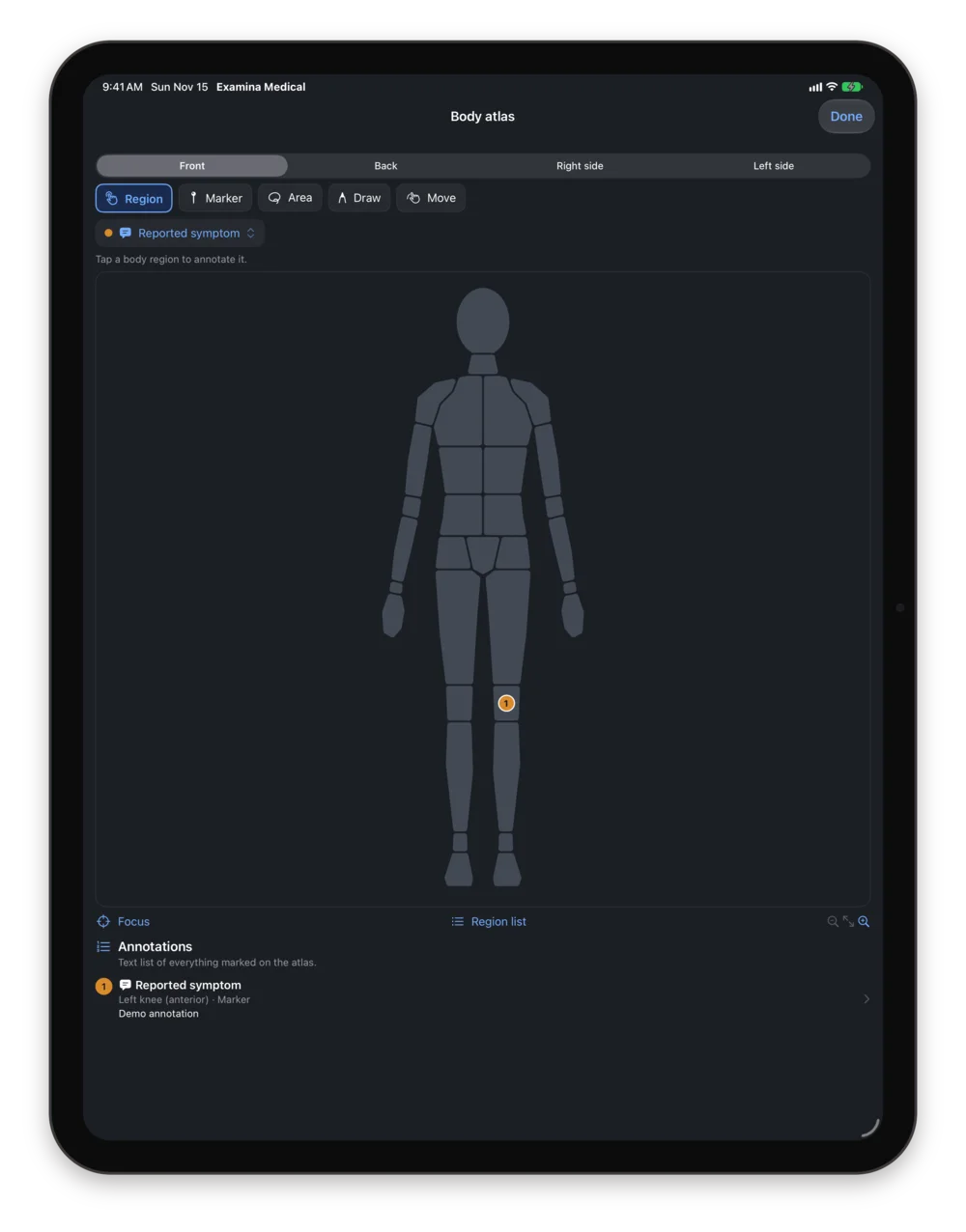
The atlas is a component of the visit, not a picture attached to it. Mark where the patient reports a symptom and where you observed a finding, on the right side of the body, and the location travels with the record into the review, the comparison over time and the export.
- Four views
- Front, back, right side and left side, with regions grouped by head and neck, chest, abdomen, back, upper limb, hand, lower limb and foot.
- Region, marker, area, drawing
- Tap a region, drop a marker on a point, outline an area or draw freely, with Apple Pencil on iPad. Every annotation can be moved, edited or removed.
- Structured, not just a picture
- Each annotation stores the anatomical region and the side as data, next to its geometry. A later redraw of the atlas cannot move a documented finding, and the text list reads without the image.
- Linked to the questions
- Questions about a site open the atlas with the relevant regions highlighted; the annotations appear in the review and in the exported document.
Annotation categories in Examina Medical
- Reported symptom
- Pain
- Observed finding
- Skin / lesion
- Other
Vitals and findings, as recorded
Vital signs and measurements are stored as values with their units, exactly as you entered them. Across visits they line up by date, next to the atlas annotations of each visit, so the follow-up begins from what was written last time.
- Vital signs
- Recorded values with units. No reference ranges, no colours, no alarms when a number is high or low.
- Review of systems
- Nine body systems, from general symptoms to skin, hair and nails, each with the symptoms reported and their details in free text.
- Medications and allergies
- Medications, supplements, allergies and adverse reactions, vaccinations and implanted devices, as reported or documented. Nothing is checked against a database.
- Compare over time
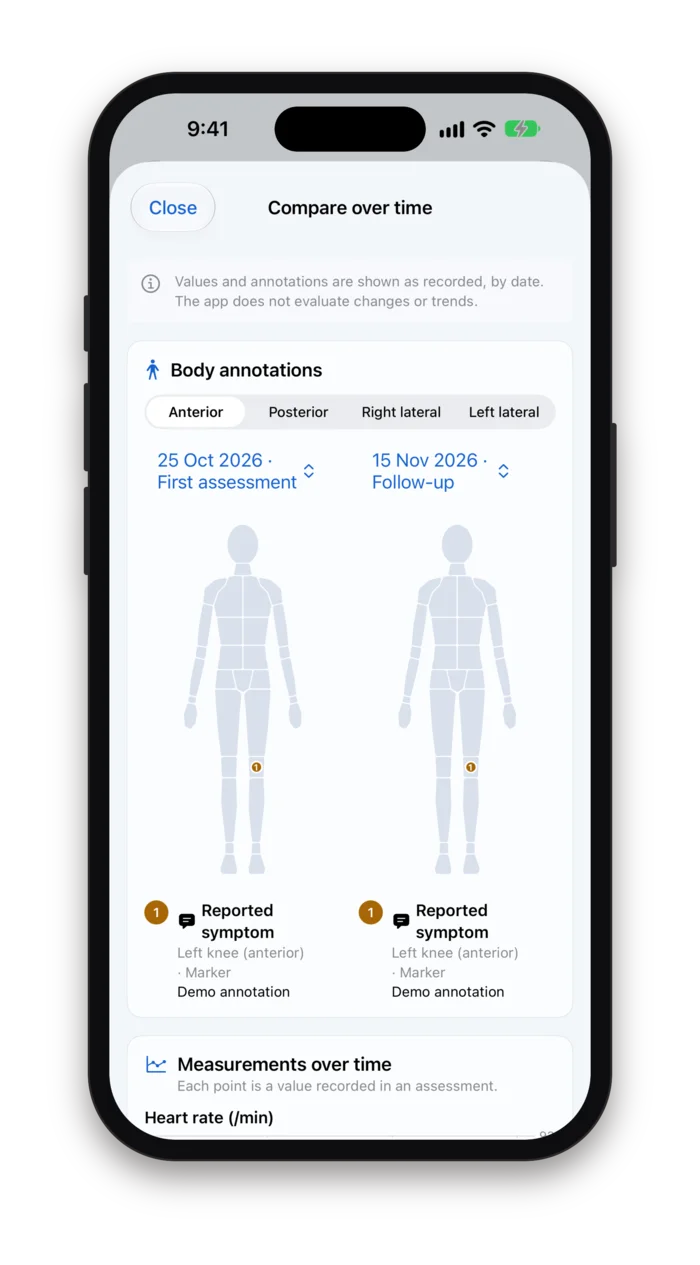
- Two visits side by side on the atlas, and every recorded measurement plotted by date.
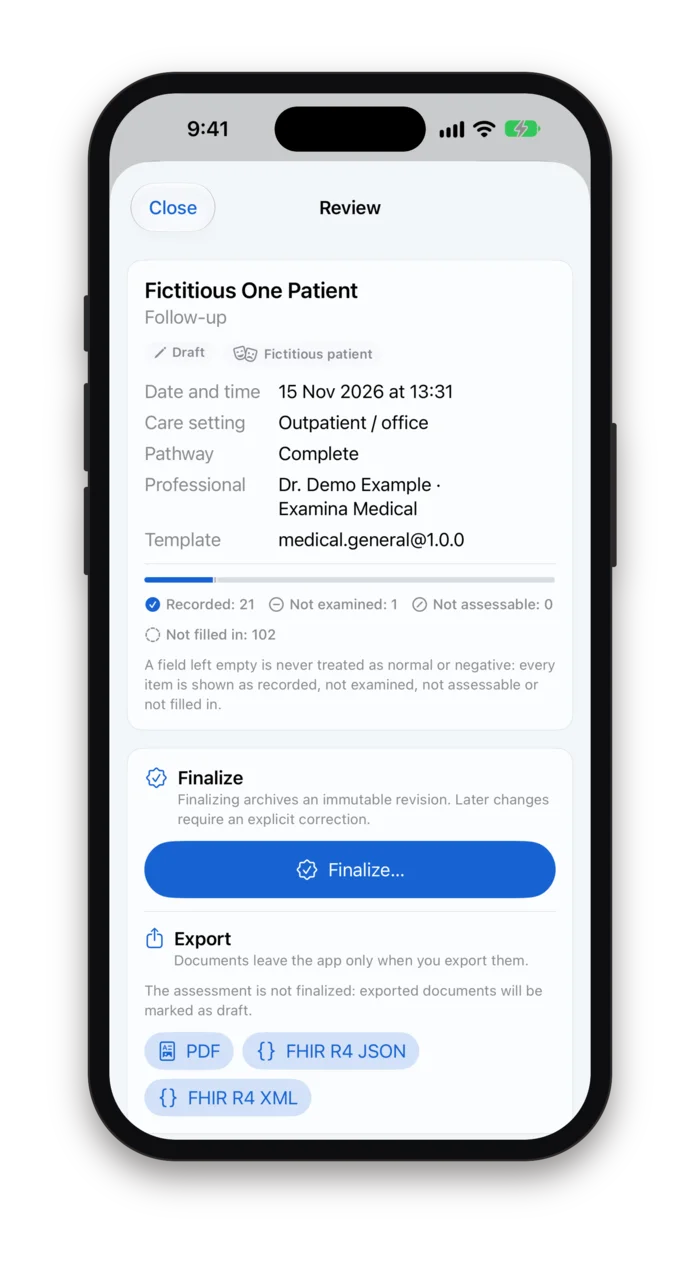
An empty field is not a normal one
Paper forms and most templates have the same flaw: a box left blank reads as nothing to report. In Examina Medical every item carries an explicit state, the review counts them, and the exported document says which parts were never filled in.
Recorded
An answer, a value or a note was entered.
Not examined
You chose not to examine or ask this time.
Not assessable
It could not be assessed, with an optional reason.
Not filled in
Left empty, and shown as such: never as normal or negative.
- Review
- The whole assessment on one sheet: patient, date, setting, pathway, author and template version, the count of each state, then every section as recorded, each with an Edit link.
- Finalize
- Finalizing archives an immutable revision. Later changes need an explicit correction, and the earlier versions stay in the history.
- Export, only when you ask
- A readable PDF, or with Examina Pro an HL7 FHIR R4 document in JSON or XML, through the share sheet or the save panel. A draft exports marked as draft. Each export leaves a trace in the app with its SHA-256 fingerprint, format and declared destination.
One app on every Apple screen
Examina Medical is a single universal app. On iPhone the visit is a vertical list of sections and the atlas opens full screen. On iPad the sections, the questions and the atlas sit side by side, with Apple Pencil for drawing. On the Mac it is a native window with a sidebar, search and keyboard shortcuts.
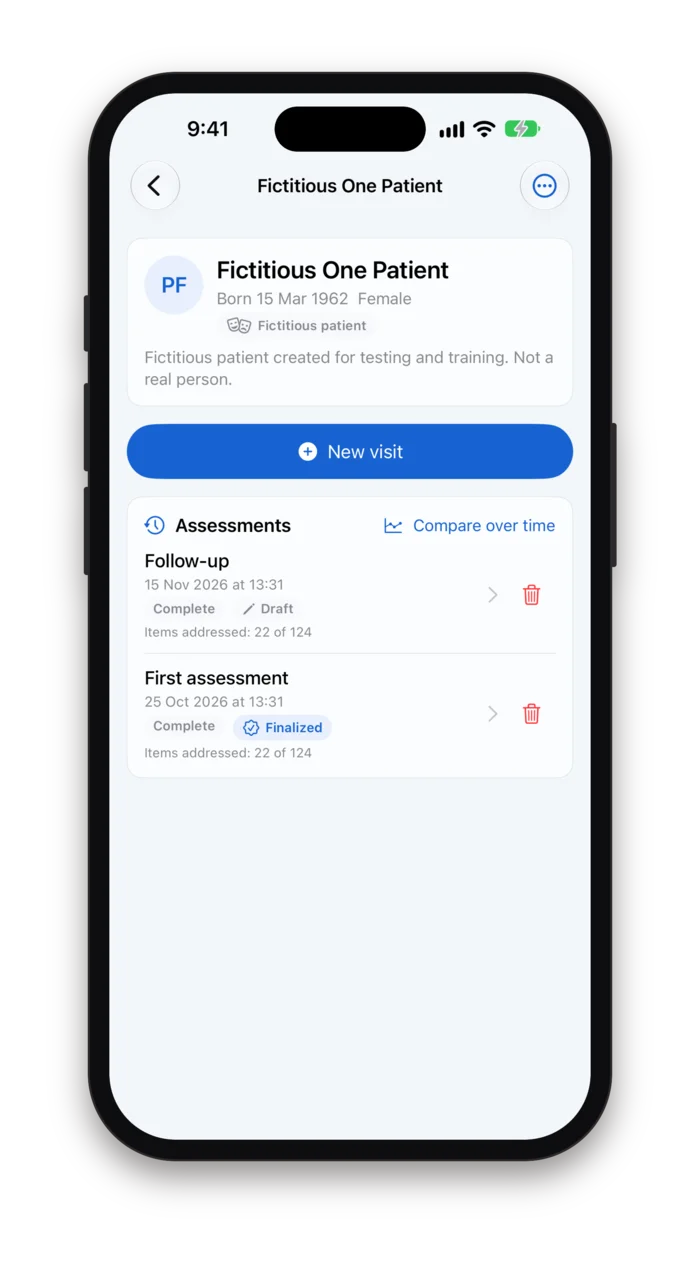
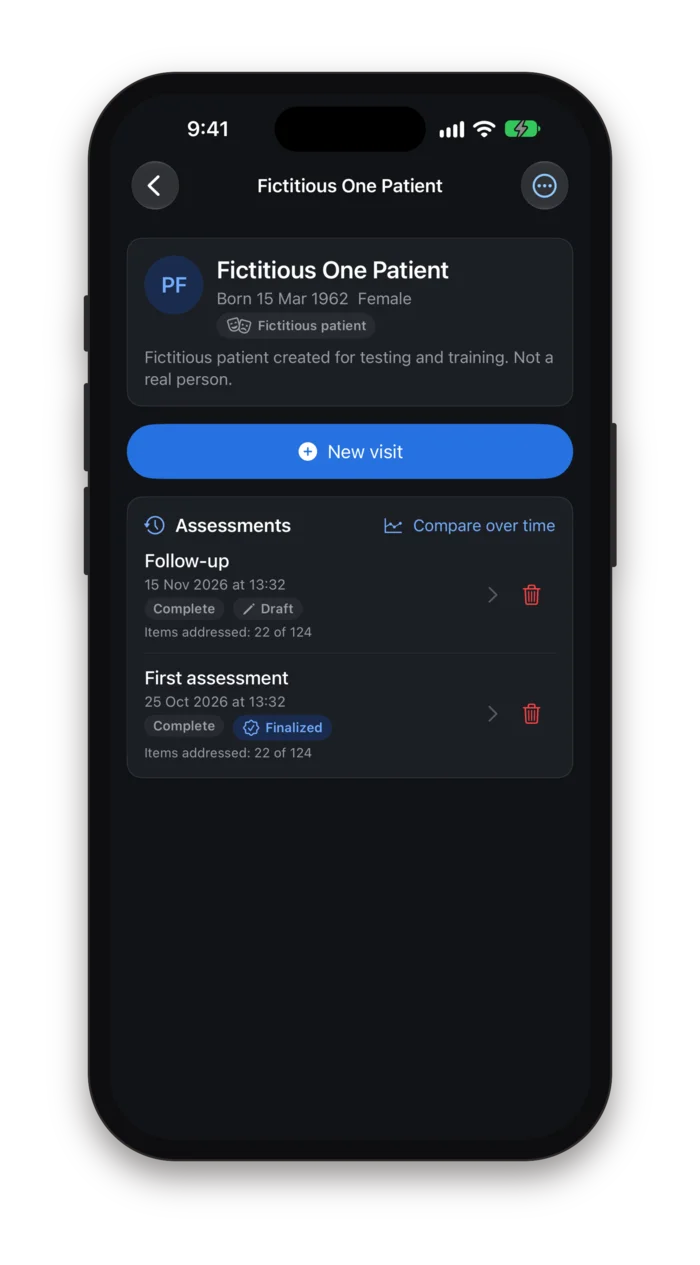
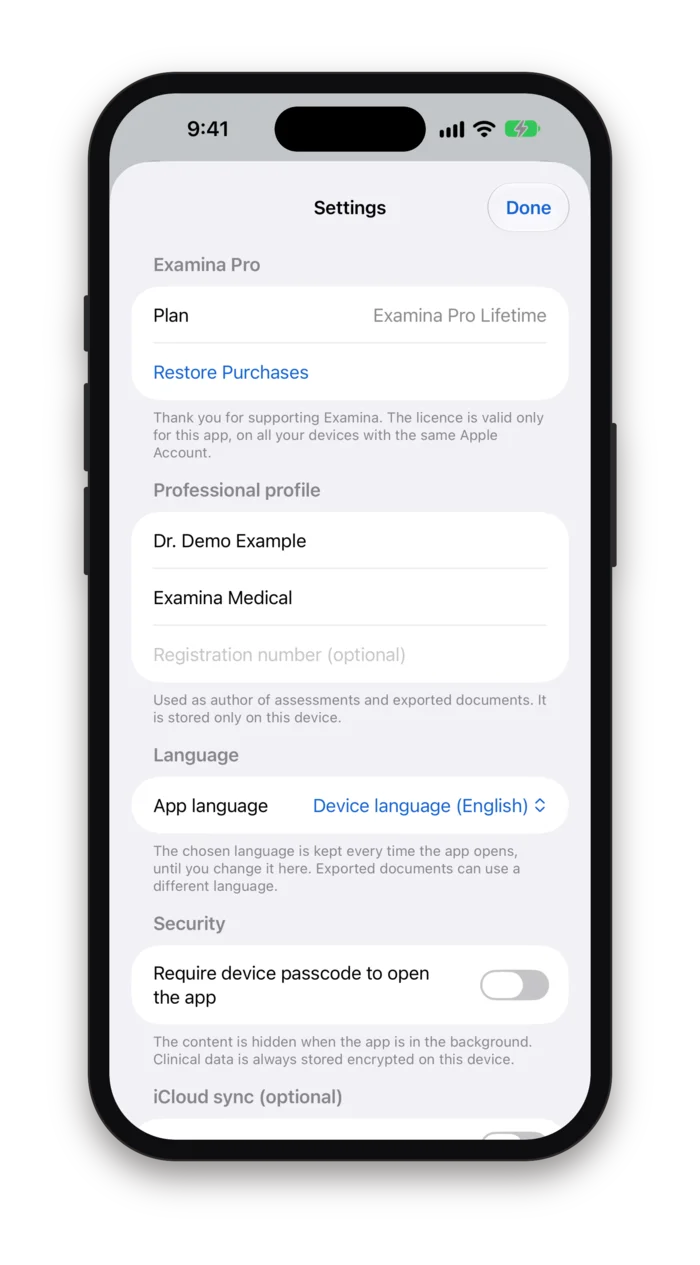
iPhone, light and dark
The patient record with its visits and the comparison over time. Every screen follows the light or dark appearance set on the device.
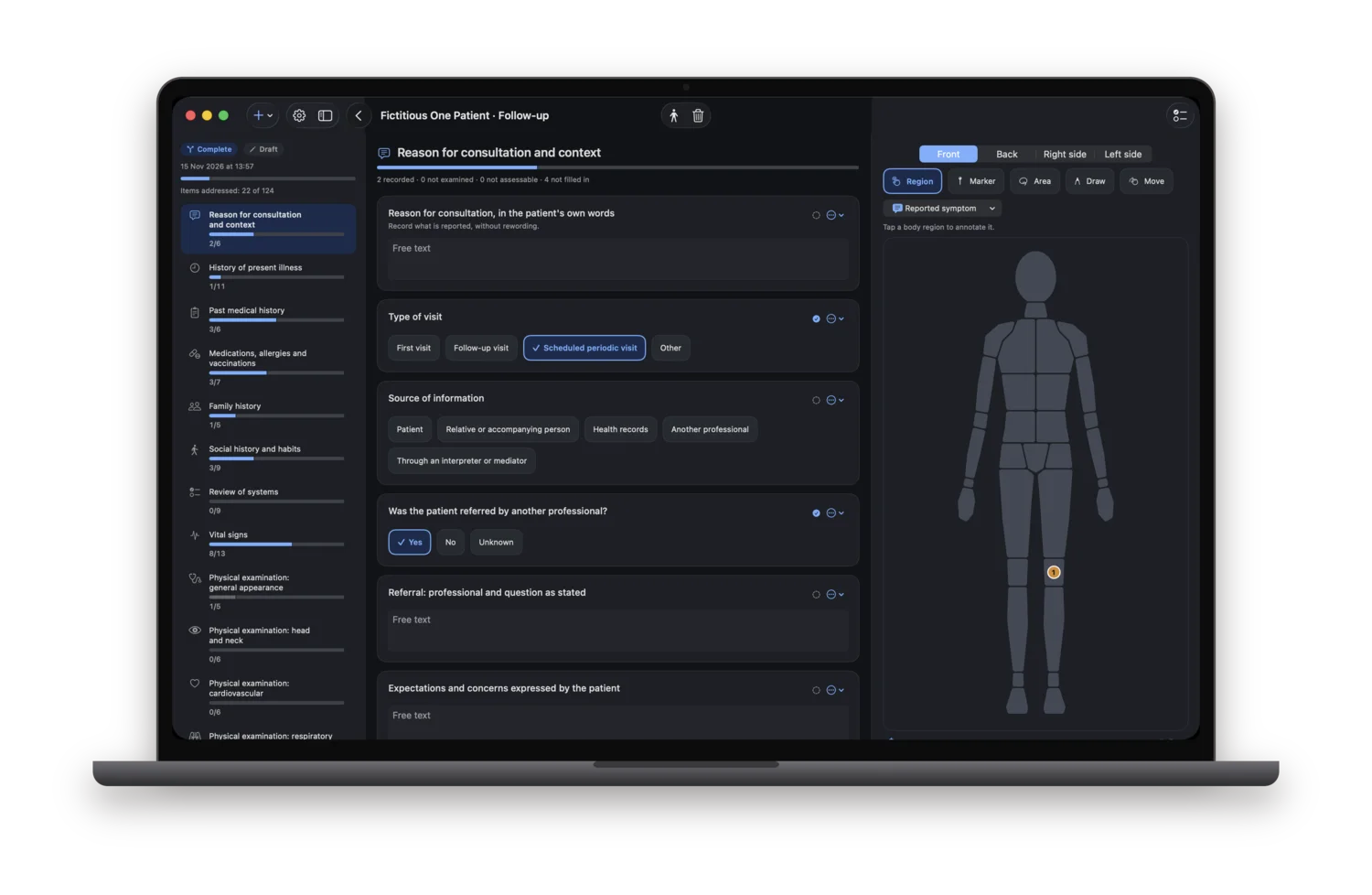
Mac
Three columns: the sections with their progress, the questions of the current section, the atlas. Native macOS, not an iPad app in a window.
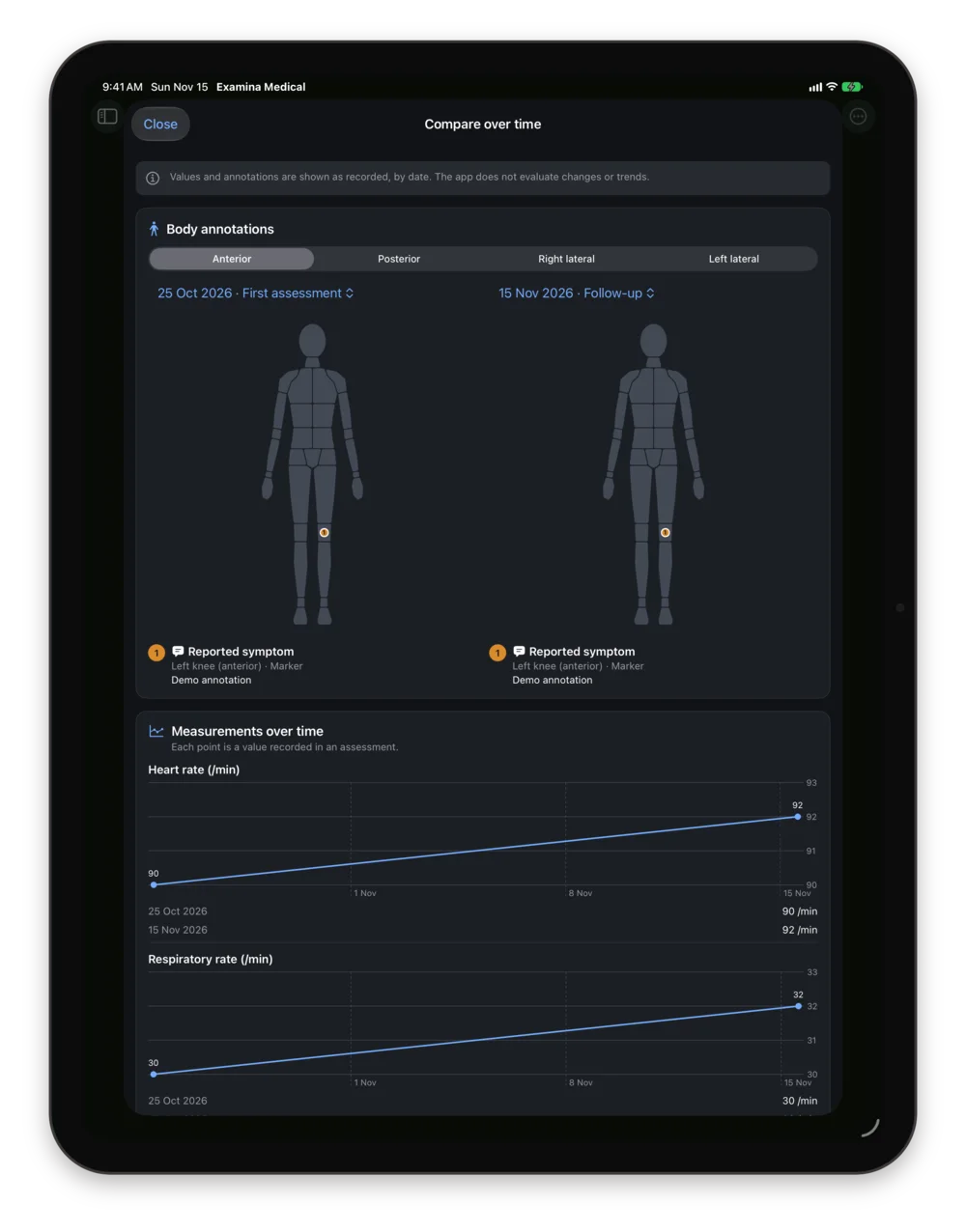
iPad
Two visits side by side on the atlas, with every recorded value plotted by date below.
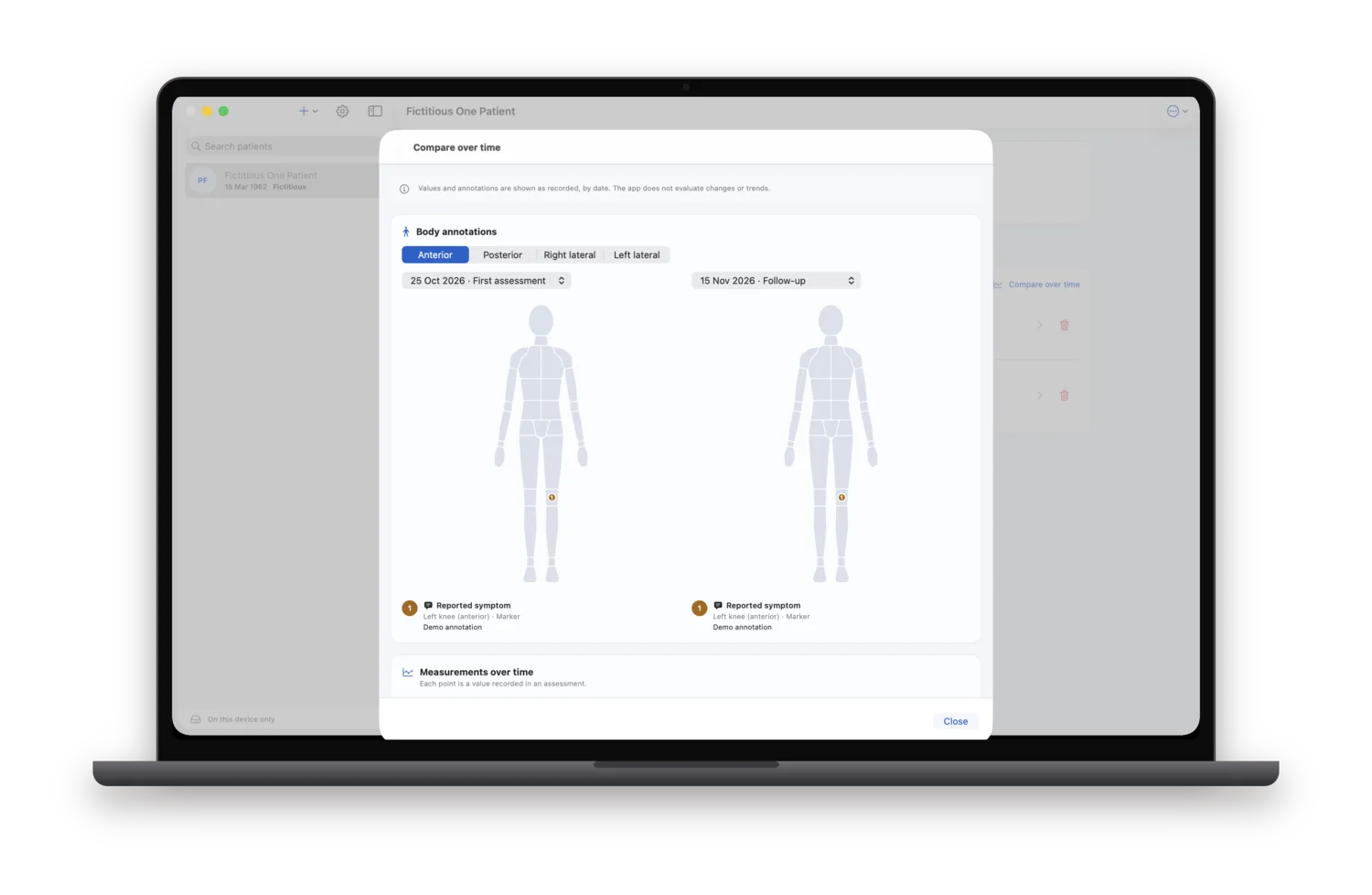
Compare over time
The same comparison on the Mac. Values and annotations are shown as recorded; the app does not evaluate changes or trends.
Patient data stays with you
There is no Arpacore server, no account and no clinical database of ours. The records live in the app on your device, encrypted by the app itself, and leave it only when you export a document or turn on sync with your own iCloud.
Encrypted by the app
Every record is sealed with ChaCha20-Poly1305 before it is written, with a 256-bit key kept in the Keychain. Only the record type, opaque identifiers and dates stay readable.
iCloud only if you want it
Sync between your own iPhone, iPad and Mac comes with Examina Pro and is off by default. Turned on, it uses your private CloudKit database, and records travel already encrypted. Each Examina app has its own container.
Nothing collected
No account, no developer server, no analytics, no advertising, no third-party SDKs, and no clinical content in logs. App Store privacy label: Data Not Collected.
App lock
Optional Face ID, Touch ID or device passcode to open the app, and the content hidden in the app switcher.
Photos without metadata
Images from the photo library or files are re-encoded without location, camera model or capture date, after you confirm consent.
Erase everything
One action in Settings removes all data, from this device only or from iCloud too. A local audit log records what happened, without clinical content.
Free to start, Pro when you need more
Every documentation feature is free. Examina Pro lifts the patient limit and adds the two features that move data beyond one device: FHIR export and iCloud sync.
Free
$0
- Every pathway, section and question of the template
- The body atlas with all its tools
- Review, finalized revisions and comparison over time
- PDF export
- App lock, recovery key and erase all data
- Up to five patients, fictitious ones included
Examina Pro
Everything in Free, plus
- Unlimited patients
- HL7 FHIR R4 export, JSON and XML
- iCloud sync between your iPhone, iPad and Mac
- Monthly
- $4.99
- per month
- Yearly
- $39.99
- per year, 1-week free trial
- Lifetime
- $99.99
- one-time purchase
- The three plans unlock exactly the same features. The free trial is for new yearly subscribers.
- One purchase covers iPhone, iPad and Mac with the same Apple Account. Each Examina app has its own licence.
- If a subscription ends, nothing is deleted or locked: you can still open, edit and export to PDF everything you recorded. iCloud sync pauses until you renew.
- US prices. The App Store shows the price in your currency. Subscriptions renew automatically and can be cancelled in your Apple Account settings.
What it deliberately does not do
Examina Medical records what you observe and what the patient reports. Clinical judgement stays with you, so the app leaves out everything that would try to make it for you.
- No diagnoses or diagnostic suggestions
- No suggested treatments or interventions
- No triage and no alerts
- No calculated or interpreted scores
- No thresholds or colours that judge a value
- No measurements from device sensors
Who it is for
General practitioners
A complete first visit and quick follow-ups, with the history kept per patient on the iPad or Mac in the surgery.
Private practice
Specialists seeing patients in their own office, who want a structured record without a practice management suite.
Trainees and residents
The full sequence of history and examination as a checklist, to build the habit of not skipping a system.
Home and occupational visits
Works offline on an iPhone, and the PDF is ready to hand over or file at the end of the visit.
A structured medical visit on iPhone, iPad and Mac. Coming soon to the App Store.
Examina Medical is a documentation tool for healthcare professionals, not for patients. It does not make diagnoses, suggest treatment, perform triage, raise alerts or calculate scores, and it does not replace professional judgement or the clinical record your organisation requires. Before turning on iCloud sync or exporting a document, check that this is allowed where you work. The screenshots show a fictitious patient created by the app for testing; no real person is depicted.