OpenAPI Credit · Free · macOS
Your OpenAPI balance,
always in the menu bar.
OpenAPI Credit is a menu bar app that shows the remaining credit of your OpenAPI account and refreshes it at the interval you choose. One glance at the top right of the screen tells you whether the next batch of calls will go through — no dashboard, no login, no window.
Version 1.2 · 2.7 MB · Universal binary · Requires macOS 13 Ventura or later
Signed with a Developer ID certificate and notarised by Apple
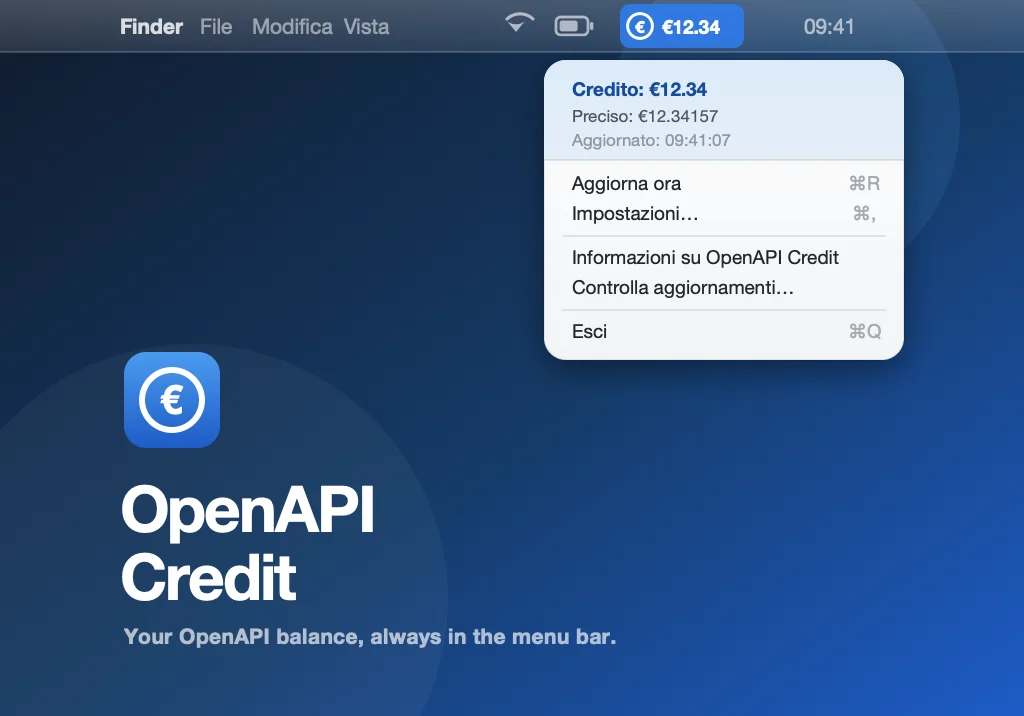
The balance, next to the icon
The figure in the menu bar is your remaining credit to two decimals, prefixed with the currency symbol you chose. No window to open, nothing in the Dock.
The precise figure, in the menu
Open the menu and you get the same balance to five decimals, exactly as OpenAPI returns it, together with the time of the last reading.
Refreshed on your schedule
Set the interval in minutes, from one upwards; sixty, one reading an hour, is the default. Aggiorna ora (⌘R) forces a reading whenever you need one.
Four states, no guessing
The menu bar item never shows a stale figure dressed up as a fresh one. When something is wrong it says so, in the bar itself, and the menu tells you what.
| In the menu bar | State | What it means |
|---|---|---|
| €12.34 | Balance | The last reading succeeded. This is your credit, refreshed at the interval you set. |
| ⚠︎ Config | Not configured | No email or API key yet. The menu says so and points you to Impostazioni… |
| ⚠︎ Rete | Network | The request to oauth.openapi.it did not go through. The menu shows the error macOS reported, and the next scheduled refresh tries again. |
| ⚠︎ Errore | Bad answer | The server replied, but not with a valid credit — typically wrong credentials. Check email and API key in Impostazioni… |
Set up in under a minute
Open Impostazioni… (⌘,) from the menu. Four fields, and the balance appears as soon as you press Save.
- The address of your OpenAPI account.
- API key
- From your OpenAPI dashboard. Typed into a secure field, never shown back.
- Refresh (min)
- How often to read the balance, in minutes. Any number from 1 upwards; 60 by default.
- Valuta
- The symbol shown before the figure. € by default — change it if your account is billed in another currency.
Running underneath
GET https://oauth.openapi.it/creditAuthorization: Basic base64(email:api-key)The same call you would make from a script. The reply's credit field is what you see in the bar; accurate_credit is the precise figure in the menu.
Where your settings live
~/Library/Application Support/OpenAPI Credit/config.jsonA plain JSON file you can read, back up or edit by hand. The app writes an empty one on first launch.
Updates that check themselves
A few seconds after launch, OpenAPI Credit quietly reads a small manifest on our release server. If there is a newer version it tells you; if not, it stays out of your way. Controlla aggiornamenti… in the menu always answers, including "you are up to date".
Downloaded and verified
Scarica saves the new disk image to your Downloads folder, checks its SHA-256 against the manifest, and only then reveals it in the Finder. A file that does not match is discarded.
Skip a version, once
Ignora questa versione keeps the launch check quiet for that version only. The next release is proposed again.
Nothing installs itself
The app never replaces itself in the background. You drag the new version to Applications, exactly as you did the first time.
Security and privacy
Signed and notarised by Apple
Signed with a Developer ID certificate issued to Arpacore B.V. and notarised by Apple, so it opens with a double click — no security warnings, no right-click workaround.
Two addresses, and only two
oauth.openapi.it, to read your balance with your credentials, and our release bucket on Amazon S3, to check for updates. No analytics, no telemetry, no other connection of any kind.
Your credentials stay on your Mac
Email and API key are saved in a plain JSON file in your Application Support folder and sent to OpenAPI over HTTPS, nowhere else. The file is not encrypted: treat it like any other credential on disk.
No admin password, ever
No installer, no background daemon, no privileged helper, no kernel extension. Drag it to Applications and it runs as an ordinary app.
No special permissions
OpenAPI Credit asks for no access to your files, screen, camera, microphone, contacts or accessibility features.
Nothing exotic under the hood
One HTTPS request with HTTP Basic authentication, the same call the OpenAPI documentation describes. What you see is exactly what the API returned.
Installing
- 1
Download the disk image and open it
Grab the .dmg using the button above and double-click it to mount.
- 2
Drag OpenAPI Credit onto the Applications folder
The disk image opens with both side by side. You can eject it afterwards.
- 3
Launch it and enter your credentials
The coin appears in the menu bar reading ⚠︎ Config. Open Impostazioni…, type your OpenAPI email and API key, press Salva. The balance shows up within a second.
Nothing seems to happen? Look at the menu bar.
The € coin appears at the top right of your screen, reading ⚠︎ Config until you enter your credentials. OpenAPI Credit has no Dock icon and opens no window on its own — that is by design.
Good to know
The interface is in Italian
Menu, settings window and dialogs are in Italian, the language of the OpenAPI service itself. The balance is a number and the settings are four labelled fields, so you will not get lost; this page tells you what each item says.
The figure is as fresh as the last reading
Between refreshes the balance does not move, even while your calls are consuming credit. The Aggiornato line in the menu tells you the time of the reading; ⌘R gets you a new one.
Upgrading from an earlier build
Earlier copies of OpenAPI Credit carried a different bundle identifier. Version 1.1 and later are a fresh app under the Arpacore identifier: quit the old copy, drag the new one to Applications and replace it. Your settings are kept, because they live in a folder named after the app, not after the identifier.
Found a bug, or want OpenAPI Credit to do something else?