CBI SEPA Builder · Mac · macOS 13.5 or later
From a list of transfers
to the file the bank wants.
Italian banks accept batch credit transfers as a CBI XML file, and almost nobody writes one by hand. CBI SEPA Builder takes the spreadsheet you already have, beneficiary, IBAN, reference, amount, date, finds the columns on its own, and produces a CBIPaymentRequest file ready to upload to the bank's portal.
Your company and bank details are typed once and kept as profiles. The transfers and the XML are shown before you export, and nothing leaves the Mac.
Version 1.4 · English and Italian · Free for up to five payments per file, subscription for unlimited
No account · No upload · No analytics · Everything stays on the Mac
One task, done properly
The CBI standard, kept by the Italian banking consortium of the same name, describes how a company sends its bank a batch of SEPA credit transfers: one XML document, a header with the ordering party and a control sum, then one block per transfer. Most portals accept it, few produce it, and the alternative is typing every transfer into the bank's web form.
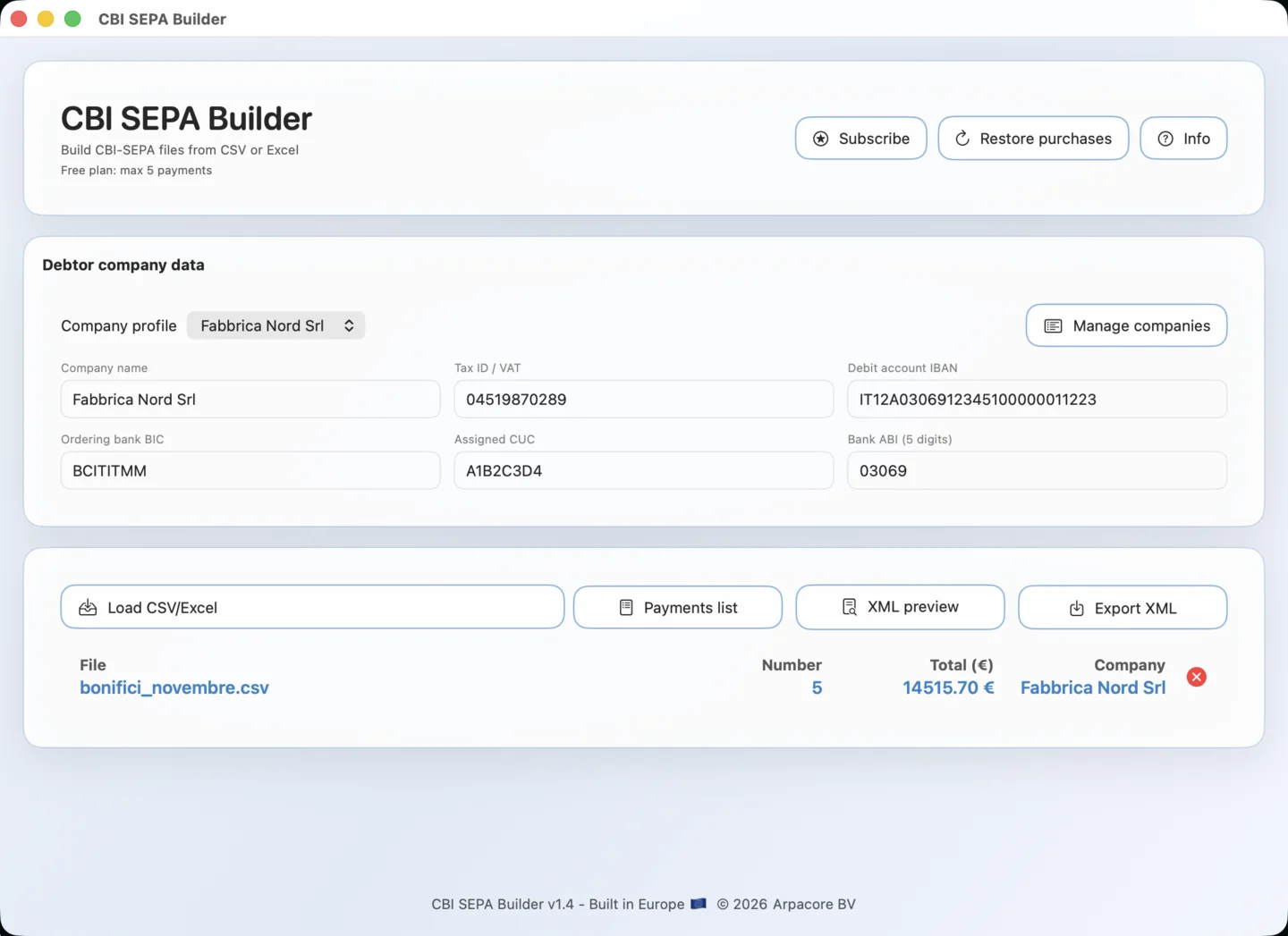
CBI SEPA Builder does the conversion and nothing else. Load the file, check the payments and the XML in their own windows, export. The format details, namespaces, identifiers, the two-decimal rounding of amounts, the 35-character end-to-end references, are handled for you and shown in the preview so you can see exactly what the bank will receive.
Load
A CSV with commas or semicolons, or an .xlsx workbook. The header row and the five columns are found by their names; nothing has to be in a fixed position.
Check
A summary line with count, total and company, a Payments list window with every transfer, and an XML preview you can read and even edit before export.
Export
One click writes a CBIPaymentRequest 00.04.01 file with your company as debtor and one transfer block per row, ready for the bank portal.
The spreadsheet you already have
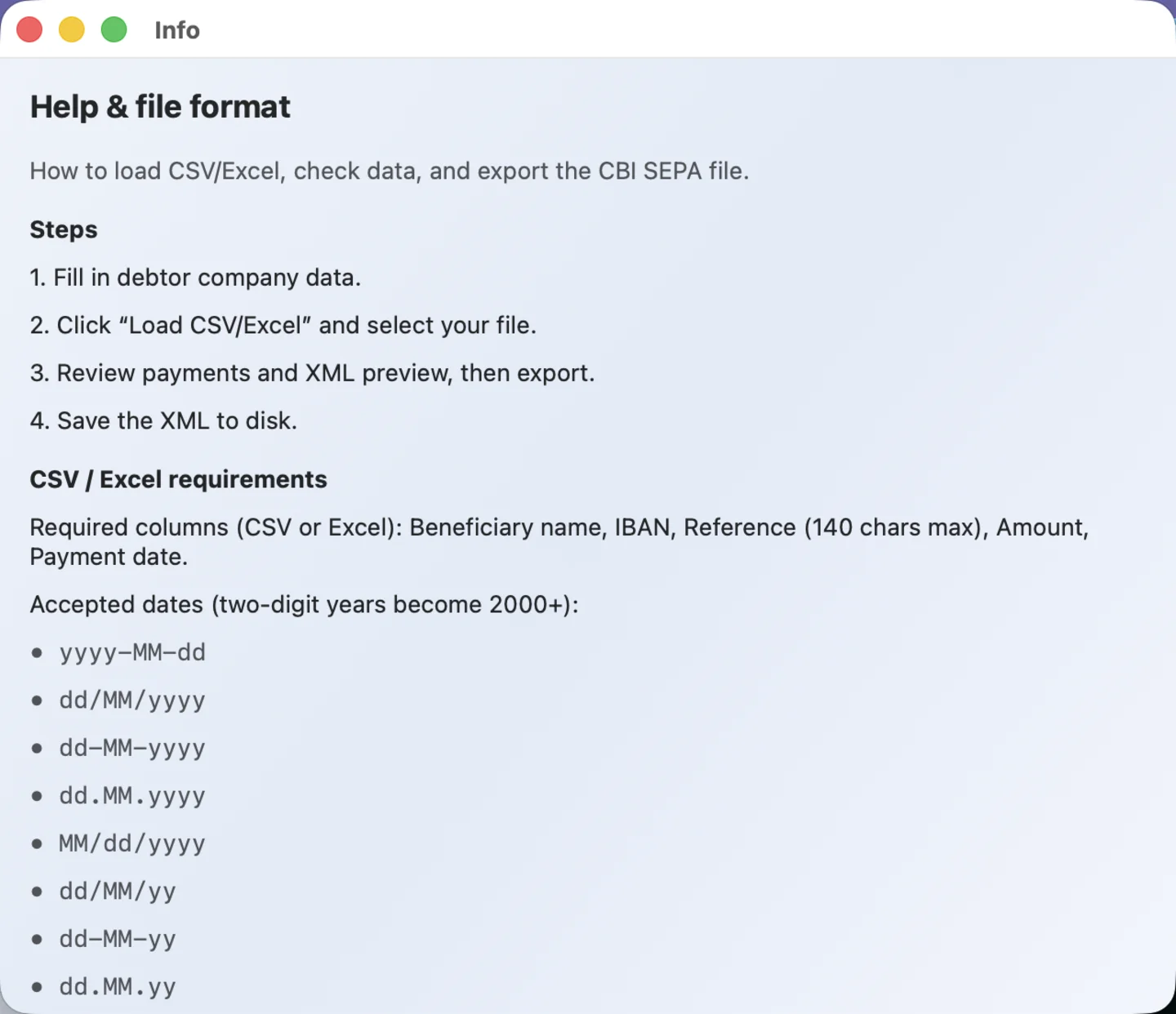
A CSV or an Excel workbook with five columns, in any order and under the headings you normally use. The app looks for the header row, maps the columns by their names in Italian or English, and reads the rows below it.
| Column | Recognised headings and rules |
|---|---|
| Beneficiary | Nome beneficiario, Beneficiario, Intestatario, Ragione sociale, Beneficiary name, Beneficiary. The name of the creditor as it will appear in the transfer. |
| IBAN | Any heading containing IBAN. Spaces are removed and letters upper-cased. This column also marks the header row: the first row containing an IBAN heading is taken as the header. |
| Reference | Causale, Causale pagamento, Descrizione, Reference, Reason. Truncated to 140 characters, the SEPA limit for unstructured remittance information. |
| Amount | Importo, Importo euro, Amount, Imp. Comma or dot as decimal separator, with or without thousands separators; rounded to two decimals in the file. |
| Execution date | Data esecuzione, Data di esecuzione, Data operazione, Data, Payment date, Execution date. Eight formats from yyyy-MM-dd to dd.MM.yy, and Excel serial dates; two-digit years are read as 2000 onwards. |
A valid file, in full
Nome beneficiario;IBAN;Causale;Importo;Data di esecuzioneRossi Impianti Srl;IT60X0542811101000000123456;Fattura 2026/118;2480,00;28/11/2026The Info window exports a sample CSV and a sample Excel file with these headings, in the language of your Mac.
- Any order, any extra columns
- Only the five columns are read; other columns are ignored. If one is missing, the status line names it in plain words instead of exporting a broken file.
- Excel workbooks
- The app opens .xlsx files directly, without Excel installed, and reads the first worksheet that contains a header row. Legacy .xls files are not supported: save as .xlsx or CSV.
- One execution date per file
- A CBI batch has a single requested execution date. The app takes the first valid date it finds in the date column; a file with no readable date is reported, not exported.
- Rows that cannot be transfers
- A row with no amount, no beneficiary or no IBAN is skipped. A file with no valid rows at all is refused with a message.
The ordering company, once
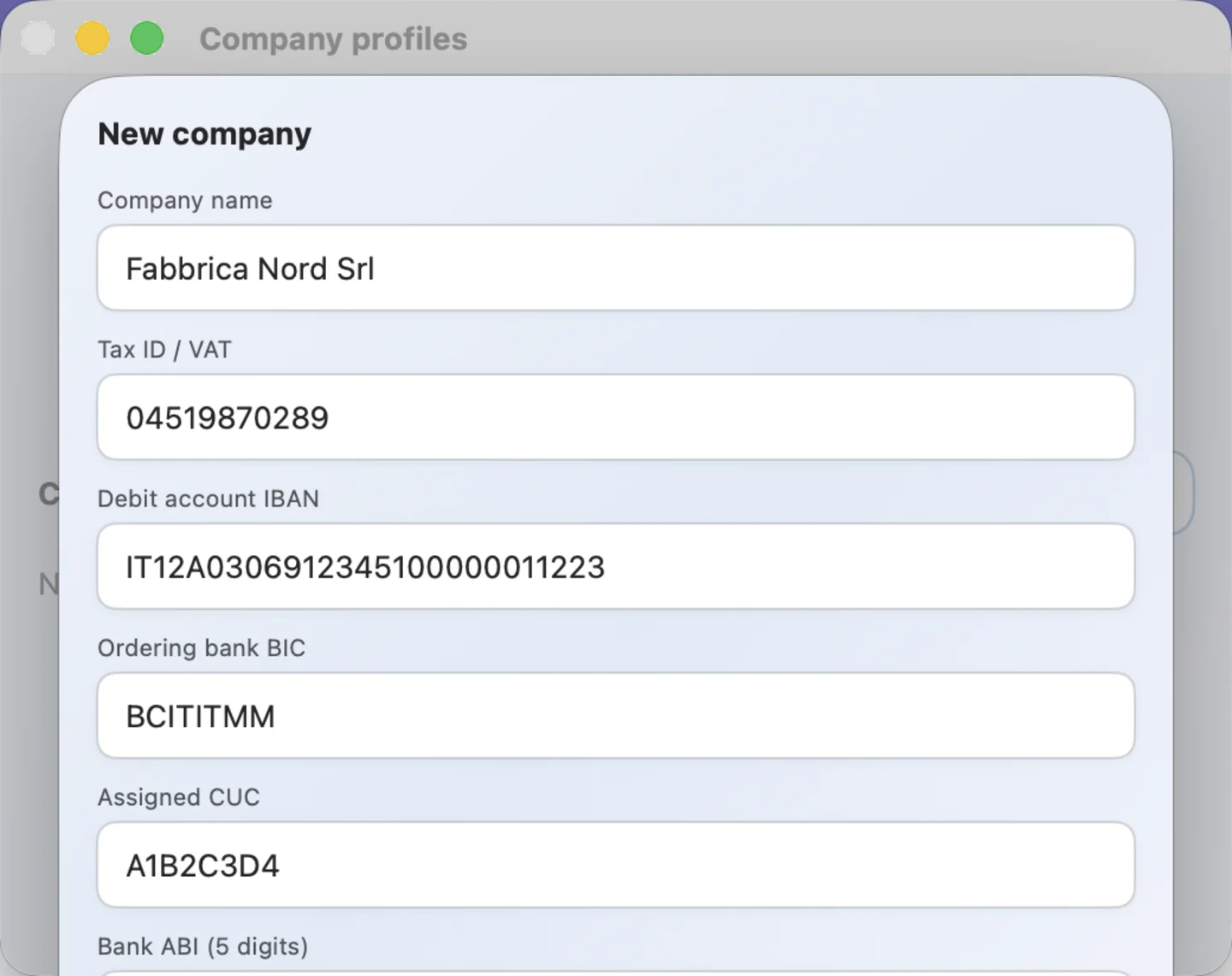
The header of every CBI file names the debtor: the company, its tax ID or VAT number, the account to debit, the bank's BIC and ABI code, and the CUC the bank assigned for CBI services. Type them once into a company profile and pick it from the menu from then on. Accountants who file for several clients keep one profile per client.
- Six fields
- Company name, tax ID or VAT number, debit account IBAN, ordering bank BIC, the CUC assigned for CBI services, and the bank's five-digit ABI code.
- Profiles
- Manage companies opens a window to add, edit and delete profiles. The selected one fills the form and the XML header; switching profile regenerates the preview on the spot.
- Where they live
- In the app's own settings on this Mac. They are not synced and not uploaded. Deleting the app deletes them.
Check it, then export it
Loading a file fills the summary line at once: file name, number of payments, total, company. Two windows let you look before you send. Export XML writes the file, named bonifici.xml by default, wherever you choose.
Payments list
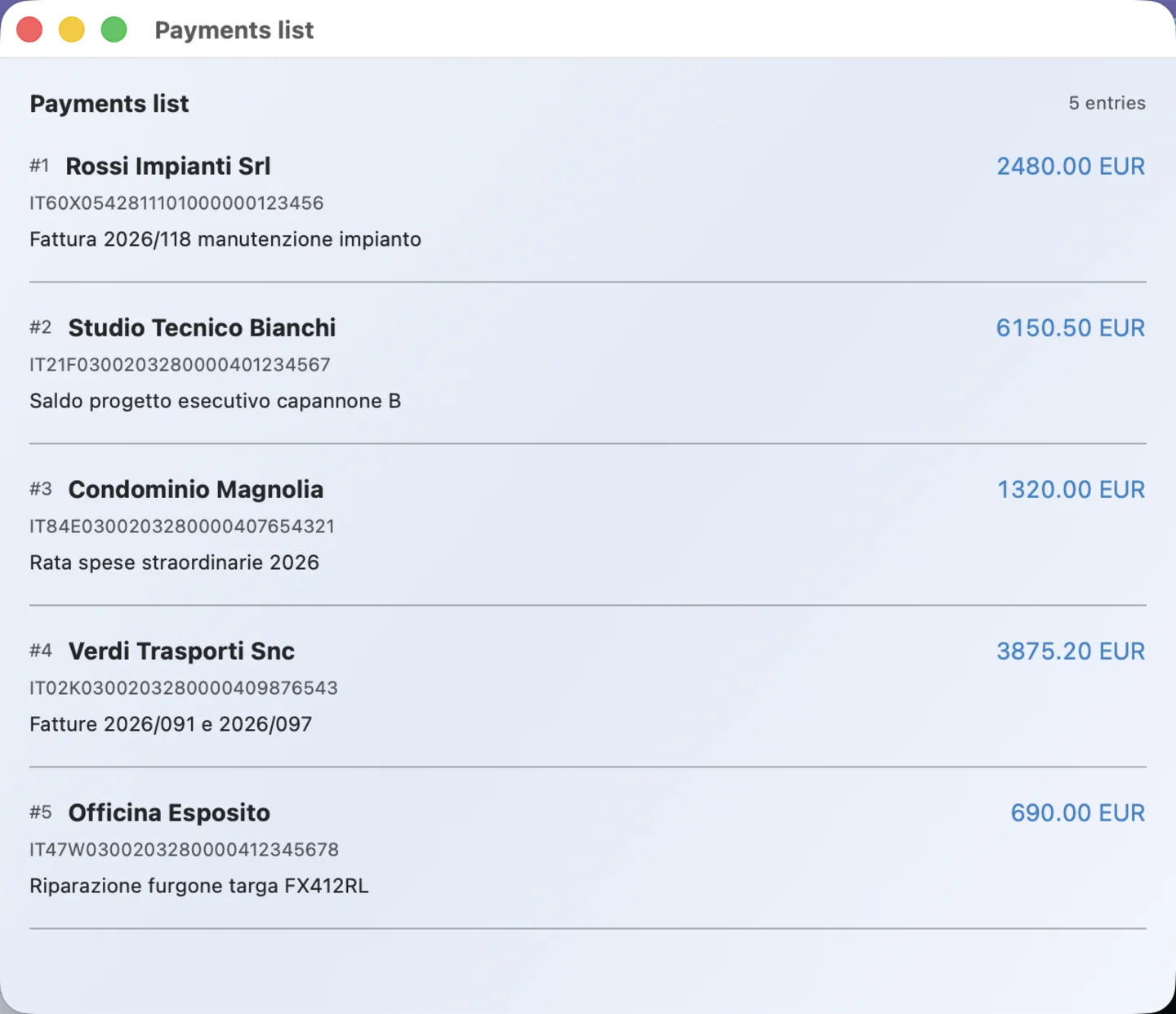
Every transfer as the app read it: number, beneficiary, amount, IBAN and reference. This is the place to catch a shifted column or a wrong decimal before the bank does.
XML preview
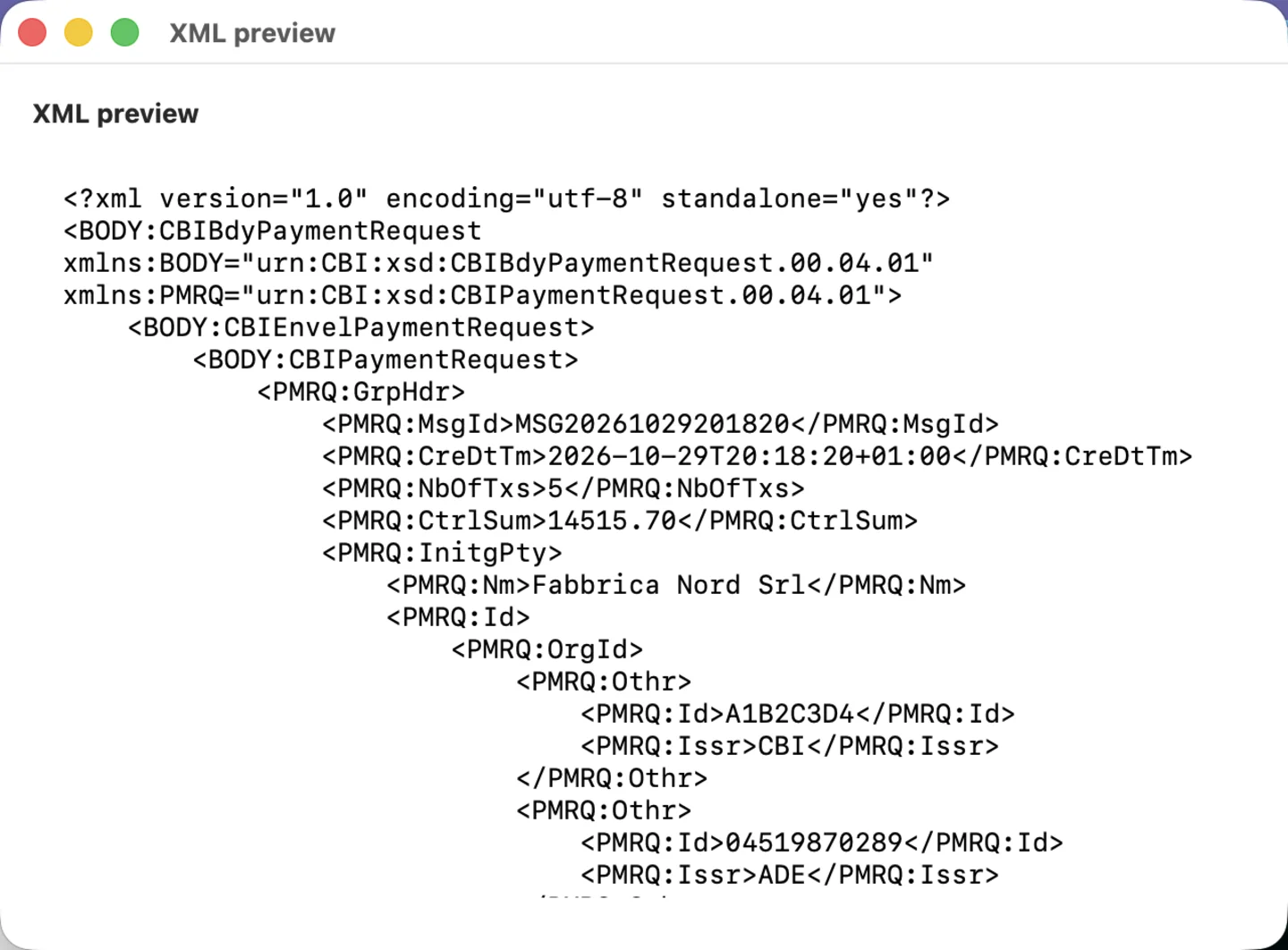
The complete file, pretty-printed and editable. Most people only read it; if your bank wants a value the app does not set, you can change it here and export the edited text.
| In the XML | Value |
|---|---|
| MsgId | MSG followed by the creation timestamp, unique per export |
| NbOfTxs, CtrlSum | Number of transfers and the sum of the rounded amounts |
| InitgPty, Dbtr | The company profile: name, CUC (issuer CBI) and tax ID (issuer ADE) |
| FwdgAgt, DbtrAgt | The bank's ABI as clearing member ID, plus its BIC on the debtor agent |
| DbtrAcct | The debit account IBAN from the profile |
| PmtMtd, SvcLvl | TRA and SEPA: an ordinary SEPA credit transfer |
| CtgyPurp, ChrgBr | SUPP (supplier payment) and SLEV (shared charges) on every transfer |
| ReqdExctnDt | The single execution date read from the file |
| EndToEndId | E2E, the message ID and the row number, cut to 35 characters |
| InstdAmt | Each amount with two decimals, currency EUR |
The structure, by name
CBIBdyPaymentRequest 00.04.01 as the body, CBIPaymentRequest 00.04.01 as the request, the pair that Italian banks document for SEPA credit transfer uploads. Namespaces and prefixes are written exactly as the schema wants them.
Batch booking off
BtchBookg is false, so the bank books each transfer separately on your statement, which is what accountants usually want for reconciliation.
Pretty-printed UTF-8
Indented, with an XML declaration, so the file reads well in a text editor and diffs cleanly if you keep exports under version control.
Free up to five, Pro beyond
The download is free and converts files of up to five payments with no limit on how many files. For a larger batch the app loads the first five, says so in the status line, and offers the Pro plan: a monthly or yearly subscription through the App Store that removes the limit on every file. The price is shown in the app in your store's currency, and the yearly option shows what it saves against twelve months.
Restore purchases brings the subscription to another Mac signed into the same Apple Account. Manage it from the usual App Store subscriptions page, linked from the Info window.
Bank details that never leave the Mac
The file is read on the Mac and the XML is written on the Mac. The app has no server, no account and no analytics; its only network activity is the App Store's own subscription check. The App Store privacy label reads "Data Not Collected".
Files stay where they are
The spreadsheet is read from where you chose it and the XML is written where you save it. The app keeps no copy of either.
Profiles in the app's settings
Company and bank details are stored by macOS in the app's own preferences, on this Mac only.
No server of ours
There is nothing to connect to. The only network traffic is StoreKit, Apple's own framework, checking the subscription with the App Store.
Nothing collected
No account, no analytics, no crash reporting that leaves the Mac, no advertising.
Who it is for
Companies paying suppliers
The monthly payment run comes out of the accounting system as a spreadsheet. Convert it and upload it instead of keying each transfer into the bank portal.
Accountants and payroll offices
One profile per client, one file per client, five minutes per batch. The payments list is the thing to show the client before sending.
Property managers
Condominium expenses, contractor invoices and refunds to owners in one batch, with the reference each recipient will see.
Anyone who has fought the XML
If you have ever hand-edited a CBI file to fix a namespace or a control sum, this is the tool you wished existed.
Released in December 2025. Version 1.4, from January 2026, added the Pro subscription, raised the free limit to five payments, added the sample file export and improved column detection in Excel workbooks.
Next payment run: load, check, export.
CBI SEPA Builder produces files in the CBI CBIPaymentRequest 00.04.01 structure for SEPA credit transfers. Banks differ in which optional elements they require and in how they validate IBANs, references and execution dates; check the first file with your bank before relying on it, and keep the payments list open while you do. The app does not validate IBAN check digits and does not submit anything to any bank. CBI is a trademark of its owner; this app is not affiliated with CBI S.c.p.a. or with any bank.